Troubleshooting naisdevice 
Kolide 
naisdevice cannot connect, yet
/msg @Kolide statusreports that everything is fine
- Disconnect and re-connect
naisdevice
Kolide is reporting that your device has not been seen "in a long time"
Browser not opening 
Browser does not open after you click connect.
Restart your default browser.
Firewall blocks outgoing UDP connections 
- Outgoing UDP connections to 51820/UDP must be open in your firewall and or modem provided by your ISP.
- Try using hotspot to eliminate router config problems (remember to disconnect from WiFi on your hotspot device and make sure you use 4G/5G by checking https://www.ipaddress.my/)
Fresh start 
- Stop naisdevice
- Remove configuration directory
- Mac:
rm -r "~/Library/Application Support/naisdevice/" - Linux:
rm -r "~/.config/naisdevice/" - Windows:
rmdir /s "C:\ProgramData\NAV\naisdevice\"
-
- Start naisdevice
Windows virus scanner 
Windows virus scanner blocks naisdevice.exe installer
-
Make sure you downloaded from the right source, the signature is valid and the checksum matches the file!
-
Try adding an exception: Windows Security / Virus & threat protection / Exclusions.
-
Someone reported that running naisdevice.exe from cmd.exe can help.
-
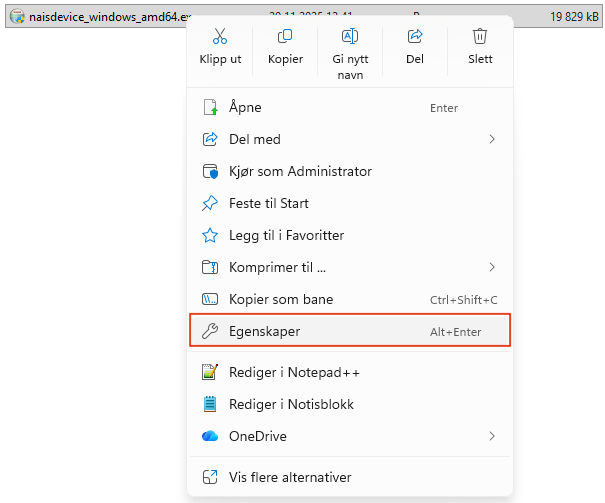
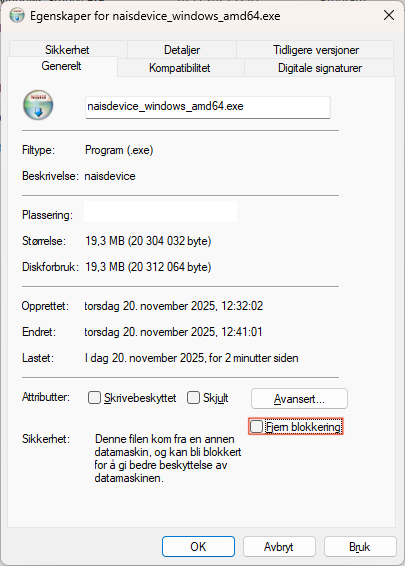
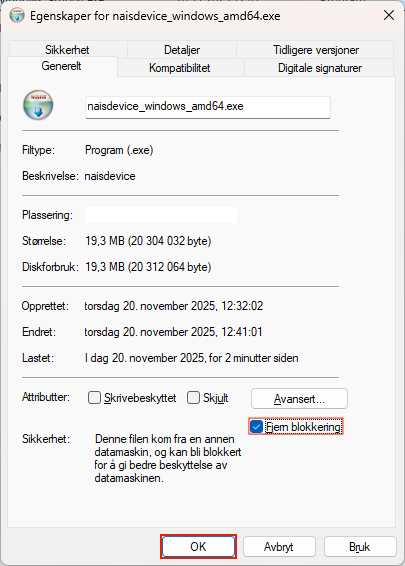
Sometimes the installer gets blocked. To unblock it, follow these steps: